Posts

Create Site in Experience Cloud Salesforce

Image
 Creating community or site is easy way in salesforce. Before creating site just take all requirements and decide which license is required. Here is the video to check how community is creating in lighting Experience Cloud.

Community Sprint 21 Release Notes - Experience Cloud

Image
 In Spring 2021, Community cloud is renamed as Experience Cloud. so terminology changed from Community cloud to Experience Cloud and Communities are changed to Site. In Setup changed All communities to Digital Experience. These are changes provided by Salesforce in terms of Terminology: Community cloud changed to Experience Cloud Community changed to Site or Experience Cloud site Lightning community changed to Experience Builder Site Lightning community template changed to Experience Builder template Lightning community theme changed to Experience Builder theme Lightning community page changed to Experience Builder page Salesforce Tabs + Visualforce community changed to Salesforce Tabs + Visualforce site Latest Community Interview Questions Click here Find the below video to create Community in Salesforce :

Salesforce Architect Interview Questions

 1) What are the points needs to consider before starting implementing Integration ? Data limitation, Data mapping ,Security 2) What are the types of wsdl in salesforce ? 2 types 1) Enterprise WSDL 2) Partner WSDL 3) What is Who ID and What ID? WhoID refers to people. Example: LeadID, ContactID WhatID refers to objects. Example: AccountID, OpportunityID 4) What are dynamic dashboards ? How to schedule dynamic Dashboards? Dynamic dashboards display data based on Logged in User.We cannot display dynamic dashboards. 5) What are the fields automatically indexed in salesforce? Id,Name,Owner(Primary Keys),Lookup and master detail fields (Foreign keys),SystemModStamp (Audit dates), External Id and Unique Id (Custom fields) 6) How many active assignment rules can create on lead/ case? Only one rule can be active at a time. 7) How to handle comma seperated values within a field while uploading using Data Loader? If there are any comma seperated values just we need to enclose the contents wi...

Build Model Error in Einstein Chatbot lighting salesforce

Image
  I have faced one issue in Einstein Chatbot. It is giving Error while Building model in chatbot.The Error is "Building models using Einstein requires at least two intents with twenty utterances each before they can be sent to be built.We recommended adding utterances to the following intent: payment" I have started investigating how to resolve this issue. 1) I have deleted the given dialogue and created with differnt API and different Name. 2) Removed all intents and created it again. 3) Created New Chatbot version 4) Created complete flow again 5) Einstein button disabled and enabled it. but all these things not resolved my issue.After long time finally i got the issue.I have created more than 20 intents.If we have any duplicate intents in Einstein bot it not allow to create model.so please make sure that there are no duplicate utterances across all the dialog , else, you will not be able to build a model.

Community/Experience Cloud Interview Questions

  Community Cloud /Experience Cloud: 1) What is community cloud/Experience Cloud ? Community cloud is a platform to connect with customers, partners, and employees.customers can view records (case,order), share documents, images etc.We can directly communicate with Agents to resolve problems. Community cloud renamed as Experience Cloud in Spring 21. From now community Builder,community workspace called as Experience Builder and Experience workspace. 2) May i know Spring 21 major updates about terminology in community/Experience cloud? Below are the major updates given by salesforce in Community cloud. Community cloud changed to Experience Cloud Community changed to Site or Experience Cloud site Lightning community changed to Experience Builder Site Lightning community template changed to Experience Builder template Lightning community theme changed to Experience Builder theme Lightning community page changed to Experience Builder page Salesforce Tabs + Visualforce community c...

Salesforce Lighting Interview Questions and Answers

 Salesforce Lightning Interview Questions and Answers Click Here

Salesforce Community Certification Test

Image
 We are Providing platform to write online test for practicing for salesforce certifications. This will make you easy to pass certifications. Click here to Write online test. Click Here to check available online tests

Salesforce Admin Certification Test

Image
 We are Providing platform to write online test for practicing for salesforce certifications. This will make you easy to pass certifications. Click here to Write online test. Click Here to check available online tests

Change Owner / Update record using Lightning Custom Button Salesforce

Image
This post is related to changes the Owner or update the record from detail page in lightning. Actually we have standard button to change the owner of the record but when we click on the lighting button it will populate the popup and ask for user to change. But here the requirement is change the logged in user direcly when we click on the button. So here we created Custom lightning component with custom Quick action to complete this task. Standard Change Owner in Lightning In classic saleforce we used custom javascript buttons to execute the functionalites but lighting not support the javascript so here we created custom component with Quick action and added in the pagelayout so we can see it in lighting.and add the button in "Salesforce Mobile and Lightning Experience Actions" section. Add caption Lightning Button Pagelayout Change owner Lightning Button  <!--change owner lighting Component --> Component Name : changeowner.cmp <aura...

Salesforce Data migration/Data Consolidation Tricks & Tips

Image
1) Change System TimeZone to UTC. Rightclick on date and time and click on Adjust date/time.in Time Zone select UTC Coordinated Universel time. Adjust date/time for salesforce data migration Adjust date/time for salesforce data migration 2) Update your dataloader time zone as GMT. Salesforce dataloader time Zone  3) Change time zone in salesforce user org to GMT+00:00 Greenwhich mean time GMT 4) While Exporting Data use UTF-8 to avoid special characters. 5) Always Use CSV file format to export and load the data. 6) While loading data keep short date system (yyyy-dd-mm)format in excel. 7) Save files with version names ex : samplefile_v1.csv 8) Turnoff Email Deliverabilities while loading data. 9) Check Field mapping in dataloader and save mapping file (slds) for feature use. 10) Check some records/data manually after load. 11) Store previous record id in any external unique field. 12 ) Learn vlookup in Microsoft excel, i will useful for Map...

Salesforce Lightning Design System - SLDS

Image
Salesforce Lightning Design System :  Salesforce has 2 desktop user interface. 1) Salesforce classic 2) Lightning Experience Salesforce lightning Design System use to design responsive webpages compatable to all the devices. we know the Salesforce classic very well because we already working from long back.Now we will learn about what is Lightning Experience in Salesforce. Lightning Experience is a easy way to Design application userinterface and develop the functionality. it is completely modern way of designing. What we are doing in salesforce Classic, we can do it in salesforce lightning. but everyone thinking why we need to switch to Lightning ??? 1) We can track sales, services easily and close deals fastly. 2) More user friendly design using SLDS. 3) Less Design and Development Efforts. Lightning design system Salesforce lightning Design System helps to desing beautiful and powerful user friendly applications.It helps to build applications easily. W...

Salesforce Classic to Lightning Intergration / Lightning Out Salesforce:

Image
What is the use of Lightning Out Salesforce ? Lightning Out is used to add lighting components into the Visualforce Page.it is a flexible and powerful feature provided by salesforce to embeded Lighting components into the any Web page. Once we embed lighting component in any visualforce page/ visualforce component we can see lightning component features in any webpage.this is possible by using lighting Out.we can display lightning component errors/exceptions also in visualforce pages. Is it possible to display ligtning component exceptions/errors in visualforce page ? Yes Is Lightning Out is a iframe ? No Where We can i Use Lighting Out ? Classic / Salesforce1 / Lightning Experience What are steps to create Lightning Out Functionality ? 1) Include <apex:includeLightning/> in the Visualforce to add Lightning components for visualforce javascript library.(Include it in begining of the page) 2) Create lightning application and include it in lighting Use.This is...

Execute logic based on logged in Usertype Standard or Community Portal User

If we want to execute the logic particular to the Usertype we can use UserInfo.getUserType.There are different usertypes in salesforce. 1) Standard 2) PowerPartner 3) CSPLitePortal 4) CustomerSuccess 5) PowerCustomerSuccess 6) CsnOnly if(UserInfo.getUserType()=='CspLitePortal' || UserInfo.getUserType()=='PowerCustomerSuccess' || UserInfo.getUserType()=='Standard'){   // Logic } Reference : https://salesforce.stackexchange.com/questions/3889/what-are-the-possible-options-for-usertype

Salesforce Ant Package.xml Metadata Types

package.xml file used to retrieve metadata using ANT from salesforce sandbox. <?xml version="1.0" encoding="UTF-8"?> <Package xmlns="http://soap.sforce.com/2006/04/metadata">     <!--Apex Classes-->     <types>         <members>*</members>         <name>ApexClass</name>     </types> <!--Apex Component--> <types>         <members>*</members>         <name>ApexComponent</name>     </types> <!-- Apex Page --> <types>         <members>*</members>         <name>ApexPage</name>     </types> <!-- Custom Application-->     <types>         <members>*</members>         <name>CustomApplica...

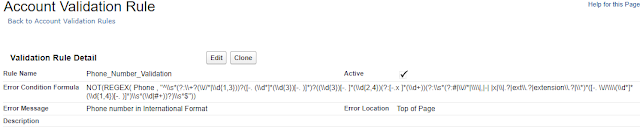
Salesforce Regex Validation Rule in International Format

Image
Create validation rule on phone or mobile field on any Account or Contact object on salesforce.Then it will check for whether phone number is given as empty or given in proper format or not. NOT(REGEX( Phone , "^\\s*(?:\\+?(\\//*|\\d{1,3}))?([-. (\\d*]*(\\d{3})[-. )]*)?((\\d{3})[-. ]*(\\d{2,4})(?:[-.x ]*(\\d+))(?:\\s*(?:#|\\//*|\\\\|,|-| |x|\\|.?|ext\\.?|extension\\.?|\\*)*([-. \\//\\\\(\\d*]*(\\d{1,4})[-. )]*)\\s*(\\d|#+))?)\\s*$")) Useful Link : https://help.salesforce.com/articleView?id=000181563&language=en_US&type=1 Account Validation rule

Script to delete multiple records using Apex salesforce

Delete multiple records from salesforce anonymous block using some script.find the below script just paste the script in the anonymous vlock and select the code and click on Execute Highlighted. Before that if any conditions need to check add it in SOQL Query or if condition then it will filter the records and delete the records. If there are more records we have to run this script multiple times .if we try to delete all the records at a time we might get the DML and limit exceptions.so adding limit in SOQL query and executing. Example :  Object : ABC__c Fields : field1__c, field2__c list<ABC__c> abclist = new list<ABC__c>(); List<ABC__c > alltldroles = [SELECT id,name,field1__c,field2__c                              FROM ABC__c LIMIT 1000]; if(alltldroles.size()>0){     for(ABC__c tldroleslist : alltldroles) {          if(tldroleslist...

Steelbrick CPQ Quote Template Notes

Image
Creating Quote is a very important functionality in the CPQ Steelbrick. Quote consist of number of products ordered and cost of the products.Steelbrick provided option to customize the template. Steelbrick provided below features to customize templates : An HTML toolbar that is used to edit and format the template. Template sections that is used to control display order of the sections. We can Repeat header and footer Visualforce inclusions for your custom code The template editor consists of two primary layout components: Sections : Blocks of information that contain one or more pieces of template content. Examples include Template Top, Line Items, and Template Bottom. Content : The actual quote-specific information that is stored within a given section. For example, the Template Top Section could contain the Prepared For, Prepared By, Quote #, Date, Expires On, Contract Start, and Contract End Content. Find the below Sample Quote. Steelbrick CPQ Quote Template...

Salesforce CPQ Release Notes

Image
Salesforce released Steelbrick CPQ latest version Winter 18. Please find the below Updates. CPQ-Steelbrick-winter18-p5 CPQ-Steelbrick-winter18-updates-p6 CPQ-Steelbrick-winter18-updates-p7 CPQ-Steelbrick-winter18-updates-p8 CPQ-Steelbrick-winter18-updates-p9 CPQ-Steelbrick-winter18-updates-p10 CPQ-Steelbrick-winter18-updates-p11 CPQ-Steelbrick-winter18-updates-p12 CPQ-Steelbrick-winter18-updates-p13

SALESFORCE STEELBRICK CPQ NOTEBOOK 5

Image
Steelbrick Pricing and Discounts :  CPQ Pricing and Discounts are ategorized into below. Pricing Methods Original Price Discounting Discount Schedules Combine Block Pricing with Discount Schedules Customer Specific Pricing find the below screenshots to understand the above concepts easily. CPQ-pricing-methods CPQ Pricing Methods are 4 types. List Cost Block Percent of Total Original Price : The Original Price field represents the “standard price” of the product Used in Price Rules to adjust the original price to pull from a block price, cost + mark-up calculation Original Price field allows the current List Price to be considered a calculated List Price or adjusted List Price so discretionary discounts and uplifts can be added on top of the calculated List Price Discounting : find the below image for CPQ Discounting information. CPQ-Discounting CPQ Discount Schedule :  CPQ-Discount-Schedule

SALESFORCE STEELBRICK CPQ NOTEBOOK 4

Image
Steelbrick CPQ Custom Actions  : Salesforce Steelbrick CPQ divided custom actions into 3 types : Buttons Menus Seperators In the image 1 represents Buttons , 2 represents Menus and 3 represent Steelbrick-CPQ-Custom-Actions Dynamic Bundles :  Create a feature that presents the user with only Miscellaneous products when Add Options is Clicked. CPQ-Dynamic-Bundles